DUTYSTACK
Product

A Daily Site Record That Writes Most of Itself

Site diaries fail in predictable ways. They get written up days later from memory, they repeat information the timesheets and inspection records already hold, and by the time anyone needs one to answer a question it is too thin to settle anything.

DutyStack assembles the labour, plant and inspection sections from records your team has already captured, leaves you to write the part that needs judgement, and keeps track of anything that arrives after the day was signed off.

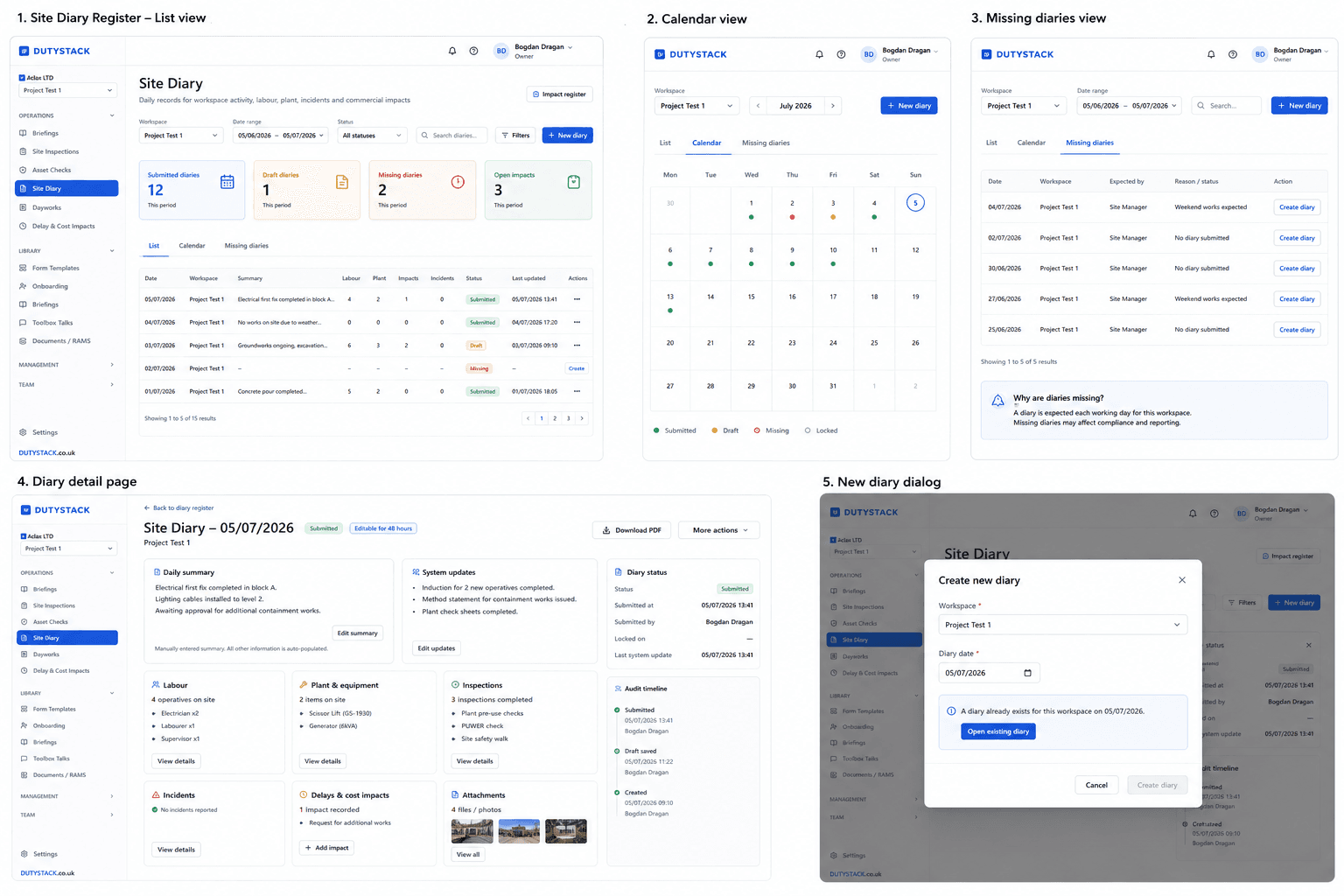
DutyStack site diary screens showing daily project records

Main features

Practical controls for teams that need records they can use during the work and share afterwards.

  • Labour summarised from recorded time entries
  • Plant listed with status and open defect count
  • Inspections gathered from checks submitted that day
  • Written daily summary and dated notes
  • Photos and PDF attachments, from desktop or phone
  • Delay and cost impacts with responsible party
  • Draft, submitted and locked day states
  • Append-only timeline with an audit trail

How the workflow works

  1. 1

    Open the day for a site. The labour, plant and inspection sections are already populated from existing records.

  2. 2

    Write the summary, add notes, attach photos and record any delay or cost impact.

  3. 3

    Submit the day. A 48-hour window stays open for corrections before it locks.

  4. 4

    If a late timesheet or inspection lands afterwards, the section is flagged as updated after submission rather than quietly rewritten.

Connected DutyStack records

This product area works best when it connects to the surrounding operational record.

  • Clock in/out
  • Asset inspections
  • Dayworks
  • Delay and cost impacts
  • Evidence packs

Three sections fill themselves in

The parts of a site diary that take longest to write are the parts your system already knows. DutyStack reads them directly rather than asking the site manager to copy them across. Because those sections describe what was true that day rather than only what happened, they stay populated on quiet days too.

  • Labour is summarised from recorded time entries, not re-keyed from a timesheet
  • Plant lists the assets allocated to that site, with current status and a count of open defects
  • Inspections shows the checks submitted on that date, graded from the result of each check
  • The written summary stays yours: nothing automated ever edits it

The diary keeps working after you sign it

Real sites do not produce their paperwork in order. A timesheet is corrected two days late, an inspection is uploaded over the weekend, a defect is raised on Monday for something found on Friday. Tools that either lose that information or silently absorb it quietly destroy the value of the record. DutyStack re-checks recent days on a schedule and lands late records on the day they belong to.

  • Late records attach to the date they relate to, not the date they were entered
  • Recent days are re-checked automatically, so nothing depends on someone remembering
  • A change after sign-off marks the section as updated after submission
  • The timeline records the system update, and an audit entry is written

Delays and cost impacts start where they happen

The person who sees a delay is rarely the person who prices it. DutyStack lets the site team record the impact at the moment it happens, as a structured record rather than a sentence buried in a note, and then hands it to whoever reviews commercial exposure.

  • Record a delay, a cost, or both, with a severity and a responsible party
  • Attribute it to the client, a supplier, a subcontractor, your own team or the weather
  • Each impact stays linked to its diary day and that day's timeline
  • Reviewers work through a separate register: open, under review, accepted, rejected or closed

A record that actually closes

Notes that anyone can edit forever are not evidence. A diary day moves through defined states and then stops changing, which is what lets you rely on it months later when someone asks what happened.

  • Days move through draft, submitted and locked, and can be reopened deliberately
  • A 48-hour window allows corrections, after which the day locks on its own
  • Timeline entries are append-only: things are added, never quietly rewritten
  • Submitted by, submitted at, locked on and last system update are all recorded

It works with no signal

Diaries are written in places with bad reception, which is exactly when people give up and promise to do it later. The DutyStack mobile app treats being offline as the normal case rather than an error state.

  • Notes, delay and cost impacts and photos can all be captured with no connection
  • Work is held in a queue on the device and sent when signal returns
  • Each queued action is de-duplicated, so a retry cannot create a second copy
  • Photos stay on the device until the server confirms it has them

Days that were never written are visible

A missing diary is easy to miss precisely because there is nothing there to look at. DutyStack works out which days should have a diary and shows the gaps in the register alongside the days that exist, so a quiet week is obvious rather than invisible.

  • Expected days are calculated for active sites, Monday to Friday by default
  • Expectations start from the date the site was created, not an arbitrary date
  • Missing days appear in the register next to the diaries that were completed

Where Site Diary stops

Site Diary is the daily narrative record, and the place delays and cost impacts are first captured. It deliberately does not try to be the system of record for everything it reports on, because those records live in the modules that own them.

  • Attendance is owned by Clock In / Out. The diary summarises it, it does not replace timesheets.
  • Inspection detail is owned by Asset Inspections. The diary reports what was submitted that day.
  • RAMS and controlled documents belong in Document Control, not in the diary.
  • Priced and signed variation work belongs in Dayworks, which is a separate signed record.

Related product areas

Clock In / Out

DutyStack gives workers a clear mobile clock in/out flow and gives supervisors attendance visibility connected to project and workforce records.

Explore Clock In / Out

Dayworks

DutyStack helps teams capture daywork records with structured evidence and sign-off, then keeps those records linked to the project history.

Explore Dayworks

Evidence Packs

DutyStack lets you select relevant records and share them through controlled, read-only evidence packs with access boundaries.

Explore Evidence Packs

Relevant industries

Site Diary FAQ

Does the site manager have to type in labour and plant every day?

No. Labour is summarised from time entries already recorded through clock in and out, and plant is listed from the assets allocated to that site along with their status and any open defects. The site manager writes the summary and the notes, which is the part that needs judgement.

What happens if a timesheet or inspection arrives after the diary is submitted?

It still lands on the day it relates to. DutyStack re-checks recent days automatically, updates the affected section and marks it as updated after submission. A system entry is added to the timeline and an audit record is written. The written summary is never changed.

Can the diary be completed without a phone signal?

Yes. Notes, delay and cost impacts and photos can be captured offline. They are held in a queue on the device and sent when the connection returns, and each queued action is de-duplicated so a retry cannot create a duplicate entry. Photos are only removed from the device once the server confirms it has received them.

Can diary records include supporting photos and documents?

Yes. Photos can be captured in the mobile app, and photos or PDF documents can be uploaded from a desktop. They appear on the diary day alongside the notes and events they relate to.

How does the diary help with delay and cost evidence?

Delays and cost impacts are captured as structured records rather than free text, each with a severity and a responsible party such as the client, a supplier, a subcontractor, your own team or the weather. Every impact stays linked to its diary day, and reviewers work through them in a separate register with an explicit status.

Can a diary be edited after it has been signed off?

Only within the 48-hour correction window, after which the day locks automatically. Timeline entries are append-only, so a correction is added to the record rather than replacing what was there. A locked day can be reopened deliberately, and that is recorded.

Is Site Diary the same as RAMS?

No. Site Diary records what happened on a given day. RAMS belongs under Document Control and is one part of the wider DutyStack record set.
See how Site Diary fits your real team and records.

Start free, compare plans or book an optional practical demonstration.